2020年4月13日星期一

Gremlin Botnets: El Club De Los Poetas Muertos [Parte 6 De 6]

Y paso a paso llegamos a la última parte de esta serie. Ya hemos visto cómo puede robar fácilmente el control de una Cuenta de Developer de Android de un desarrollador si se caduca la cuenta de correo electrónico asociada a ella. Esto es algo que puede ocurrir por muchas factores, como que la cuenta de e-mail sea abandonada, o el fallezca el desarrollador y nadie elimine sus apps o tome control de ellas "legítimamente".

Figura 60: Gremlin Botnets: El club de los poetas muertos [Parte 6 de 6]

En la prueba que hicimos en la parte anterior de este artículo vimos como habíamos sido capaces de localizar con un test no demasiado grande un total de ocho cuentas de desarrolladores que podíamos controlar al ser capaces de tomar posesión de sus direcciones caducadas de correo electrónico. Pero si evaluamos ahora el impacto que estas cuentas tienen, el resultado es muy grande.

Impacto de la investigación de "los poetas muertos"

Al final, un desarrollador tiene varias apps subidas a Google Play, y cada una de esas apps tiene una base de usuarios que las han instalado. Es decir, una cuenta de desarrollador puede traer miles o cientos de miles de dispositivos móviles que unir a nuestra Gremlin Botnet por medio de convertir una a una todas esas apps en nuevas Gremlin Apps.

Figura 61: Lista de apps afectadas

En nuestro caso, con solo 8 cuentas de desarrollador se podían controlar un total de 35 diferentes apps, todas ellas con un diferente número de instalaciones, como podéis ver en la tabla, llevando a que un atacante se hiciera con una Gremlin Botnet de apps que poder volver maliciosas de una forma sencilla y de un tamaño considerable.

En nuestra investigación, el número total de instalaciones activas de estas apps ascendía a un nada desdeñable número de 4.854.350 descargas, lo que da una clara idea de la magnitud del problema que se puede producir si no se controla la caducidad de las cuentas de correo de los desarrolladores de las apps que tú, como administrador del parque móvil y/o responsable de seguridad de una empresa, no controlas.

Figura 62: Clasificación de los paquetes APK de apps en riesgo

Por supuesto, todos los paquetes de las apps que tienen una cuenta de desarrollador con una dirección de e-mail que cualquiera puede registrar debe levantar una alerta en todos los sistemas de seguridad, por eso en Tacyt, mASAPP y CyberThreats se generan esos reportes de seguridad que, si tienes la gestión de seguridad automatizada con una plataforma tipo SandaS GRC para ver tus indicadores de riesgo, te muestra la situación en tiempo real en cualquier cuadro de mandos.


Figura 63: Control del riesgo digital con SandaS GRC

Por supuesto, el problema, desde el punto de vista de seguridad, es un poco mayor y no nos podemos quedar aquí, ya que si tenemos la cuenta de un desarrollador de una app, probablemente esa aplicación necesitará infraestructura, y puede que también esté en riesgo.

Cuenta de developer, cuenta de infraestructura

Al final, cuando un desarrollador hace una aplicación móvil, probablemente necesite un backend donde almacenar datos. A este backend, que puede ser un servidor en un proveedor de hosting, o un entorno de cloud IaaS o PaaS, tendrá algún nombre de dominio, que seguramente esté registrado a su nombre, etcetera.

Es decir, si tienes una dirección de correo electrónico que pertenece a un desarrollador, probablemente también tengas la cuenta que abre muchos otros servicios de infraestructura que se pueden descubrir simplemente abriendo el código de la app extrayéndolo del APK y viendo a qué servidores se conectan, algo que como sabéis hacemos en Tacyt.

Figura 65: Links extraídos en Tacyt de una app

Por supuesto, una vez descubiertos esos servidores de backend, un atacante puede utilizar esa cuenta para ver si el desarrollador la ha utilizado como identificador del servicio. Algo muy común, pero que no debería haber pasado nunca.

El día que utilizamos la dirección de correo electrónico como identificador de cuentas, convertimos algo que debería ser siempre público (una dirección de mensajería) en algo que no tiene por qué ser público, el id que abre una zona segura en una plataforma. Una de las cosas por las que dije aquello de que el e-mail estaba muerto, ¡larga vida al e-mail!

Tacyt & CARMA: Investigar en el mundo del malware

Como muchas veces hemos contado, en ElevenPaths hacemos muchas investigaciones al respecto del malware, adware, cibercrimen o mejoras de seguridad en el mundo de las apps móviles, y compartimos esas investigaciones con otros centros de formación, organizaciones y empresas. Así, tenemos un programa de colaboración para investigación en Tacyt para evolucionar los sistemas de seguridad del mundo de las apps móviles. Nuestro compañero Sergio de los Santos ha dirigido investigaciones con la Universidad Politécnica de Madrid e IMDEA o con la Universidad Piraeus en Grecia, donde hemos dado acceso a nuestra plataforma a sus equipos de investigación. 

Figura 66: CARMA ofrece muestras de malware en apps para investigadores

Y ahora hemos dado un paso más con el lanzamiento del programa Curated Android Malware APK Set (CARMA), que es un servicio gratuito ofrecido por el área de Innovación y Laboratorio de ElevenPaths. En él se proporciona a los investigadores un conjunto de muestras de malware, adware y otros archivos potencialmente peligrosos recopilados para el sistema operativo Android. Estas muestras tienen un uso exclusivamente destinado a la investigación o estudio académico y está prohibido su uso para cualquier otro fin, lucrativo o no.

Figura 67: Solicitud de participar en el programa CARMA

El fin de estos conjuntos es proporcionar muestras de calidad que puedan ser utilizadas para su análisis en sistemas expertos, Machine Learning aplicado a Ciberseguridad, nuevas ideas usando Inteligencia Artificial o cualquier otro método que permita mejorar la detección futura de este tipo de amenazas.

Figura 68: Tipo, año y tamaños de las muestras que se pueden solicitar

Como se puede ver, en él se ofrece un conjunto de varios Gigabytes de muestras de malware completas en su formato original, no alteradas y clasificadas por año, origen y tipo de amenaza. Desde Google Play y otros markets de aplicaciones, PUP, adware, malware, etcétera, todas ellas clasificadas por años desde 2017, y  donde también hay goodware.

Conclusiones finales y PPTs

El smartphone se ha convertido en el centro de nuestra vida digital personal, y por tanto las apps son parte de nuestro desarrollo persona, profesional y en sociedad. Necesitamos tener un ecosistema seguro de aplicaciones móviles para salvaguardar nuestra vida digital.

Entender los riesgos, las amenazadas y como gestionar esos peligros es fundamental. Las Gremlin Botnets bajo el control de grupos cibercriminales o de ciberespionaje son un riesgo importante para gobiernos y empresas. Las Gremlin Apps son un riesgo para las personas en Internet que pueden ver su vida totalmente comprometida.

Figura 69: Cómo protegerse de los peligros en Internet

En esta investigación solo quisimos poner de manifiesto cómo, si no tomamos precauciones, el poseedor de una Gremlin Botnet puede tener un poder muy peligroso, y por lo tanto todos tenemos que colaborar en su erradicación.


Para terminar os, dejo las diapositivas que utilicé para la presentación de esta charla en RootedCON 2020 subidas a mi SlideShare, donde podéis ver resumido todo este largo artículo de seis partes. Esperamos que esta investigación os haya sido de utilidad y podáis aplicar alguna medida de contención de estos riesgos.

Saludos Malignos!

*********************************************************************************
- Gremlin Botnets: El club de los poetas muertos [Parte 6 de 6]
*********************************************************************************

Autor: Chema Alonso (Contactar con Chema Alonso)


Read more

15 Important Run Commands Every Windows User Should Know

There are several ways to efficiently access the files, folders, and programs in Windows operating system. We can create shortcuts, pin programs to the taskbar, Start menu shortcuts etc. but we can't do it for all programs in many cases. However, the Windows Run Command box is one of the most efficient ways of accessing system programs, folders, and settings.

In this article, I am going to share 15 most important Run commands for Windows users. These commands can make it easier to manage a lot of tasks.
How to open Windows Run command box?
You need to press Win+R (Hold Windows button then Press R)

Important Run Commands Every Windows User Should Know

1. %temp%
This is the fastest way to clear the temporary files from your computer. It can save a lot of space which was being wasted by temporary files.
2. cmd 
This command will open the windows DOS command prompt. Windows command prompt is very useful for performing many tasks which are not possible using graphical user interface.
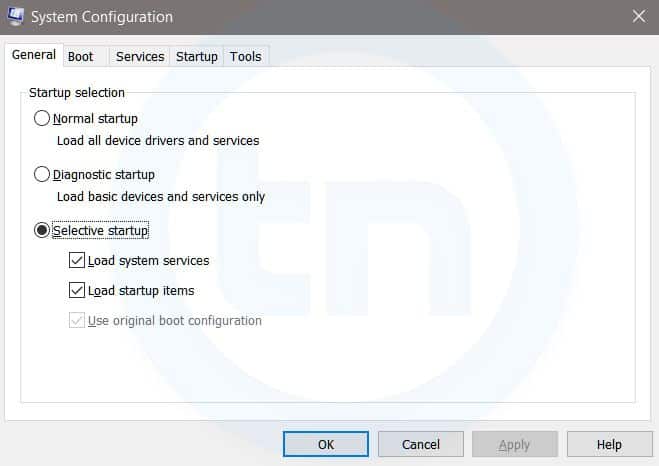
3. MSConfig
Windows Run Command - MSconfig-compressed
Windows System Configuration
This command will open Windows System Configuration where you can edit different things like the boot options, startup options, services, etc.
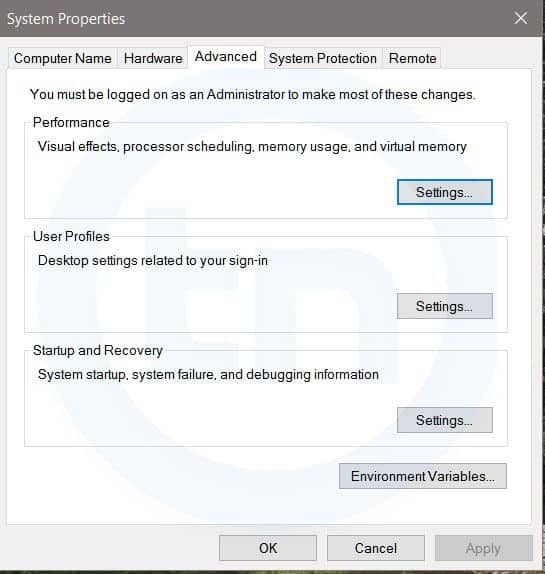
4. sysdm.cpl
Windows Run Command - sysdm cpl-compressed
System Properties window
This command will open the System Properties window, Where you can change the system protection and performance related many settings
5. Powershell
Powershell is very similar the command prompt. Just type this command in the Run dialog box, and you will have your PowerShell opened without administrator privileges.
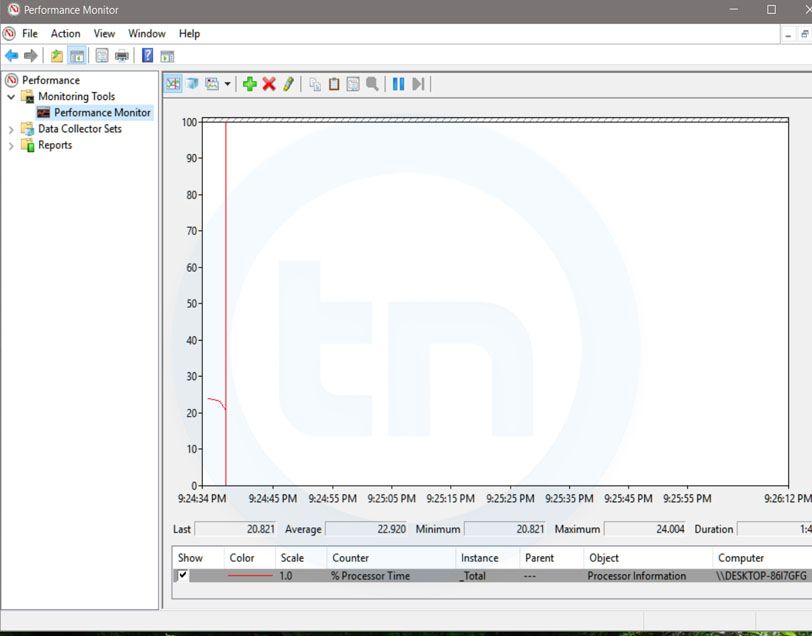
6. perfmon.msc
Windows Run Command - perfmon msc-compressed
Windows System Performance monitor
This command can be used to monitor the performance of your computer. There are plenty of options for monitoring the system performance
7. regedit
Regedit Run command is used to open the Windows Registry. It is a hierarchical database that hosts all the configurations and settings of Windows operating system, it's users and the installed software.
8. \ (Backslash)
This is one of the lesser known Run commands. Just enter the backslash into the Run dialog box and it will open up the C drive. It is one of the quickest ways to access the C drive.
9. . (Dot)
This is yet another lesser known Run command. When executed, it opens the current user's home folder which hosts all the other local folders like the Downloads, Documents, Desktop, Pictures, etc.
10. .. (Double Dots)
When you execute these two dots in the Run dialog box, it will open up the Users folder which is located directly on the C drive
11. Control
This command will open the control panel. Control panel is used for managing all the system settings and programs
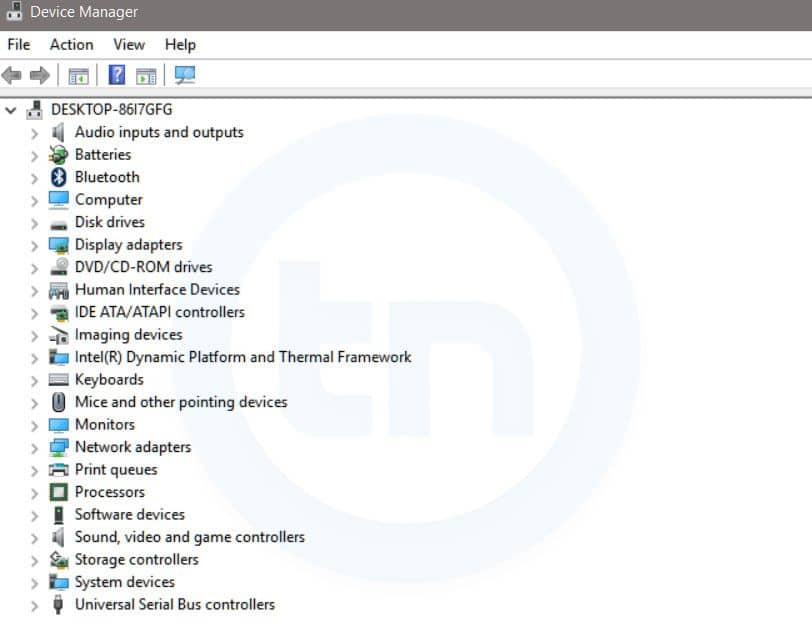
12. hdwwiz.cpl
Windows Run Command - hdwwiz-
Windows Device Manager
This command is used to open the Device Manager in Windows. You can manage all the device connected internally or externally to your PC.
13. Notepad
The quickest way to open notepad in Windows. Just type this command in Run Box and hit enter.
14. osk
This command will open On-Screen Keyboard on your display monitor. You can easily touch and type or use your mouse for typing.
15. taskmgr 
This command will open task manager where you can manage all the processes and programs running on Windows Operating system.
More info

  1. How To Hack
  2. Hacking Tools Usb
  3. Hacker Tools For Mac
  4. New Hack Tools
  5. Pentest Tools For Windows
  6. Hacks And Tools
  7. Nsa Hack Tools
  8. Hacking Tools Free Download
  9. Hacker Tools Hardware
  10. Hack Apps
  11. Hack Tools Mac
  12. Hack Tools For Ubuntu
  13. Hack Tools For Ubuntu
  14. Bluetooth Hacking Tools Kali
  15. Hacker Tools Apk
  16. Hacker Tools For Pc

ShellForge


"ShellForge is a python program that builds shellcodes from C. It is inspired from Stealth's Hellkit. Some wrapper functions arround system calls are defined in header files. The C program uses them instead of libc calls. ShellForge uses gcc to convert it into assembler. It then modifies it a bit, compiles it, extract code from the object, may encode it and add a loader at the begining." read more...
Related news

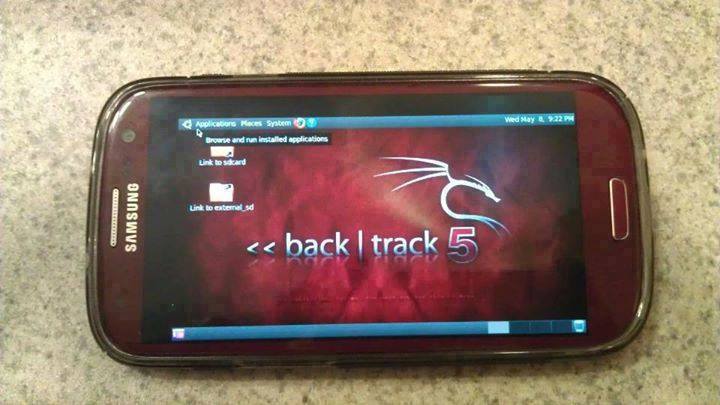
How To Install And Run Backtrack On Android

Guide you step by step to How to install and run Backtrack on android. As the Backtrack is also available with ARM architecture which makes it possible to run Backtrack on an ARM machine such as mobiles or tablets.
Recently, We are discussed Install and Run BackTrack on Windows. Android is the best OS for penetration testing. It designed for digital forensics and penetration testing or hacking tool. It comes with many more updated tools. As the Backtrack is also available with ARM architecture which makes it possible to run Backtrack on an ARM machine such as mobiles or tablets.
How To Install and Run Backtrack On AndroidRequirements
Step to Install and Run Backtrack On Android:
First of all extract the BT5-GNOME-ARM.7z. and copy the "BT5" folder and then put in your phone's root directory. Here mine phone is /sdcard. The root directory is different for different mobile devices.
  • Now install all the above apps BusyboxAndroid TerminalAndroid Vnc.
  • After installing BusyBox application open it and wait until it finishes loading and then click on Smart install.
  • Now open the android terminal and type the following command:
    su cd /sdcard/BT5sh bootbtNOTE :- When you type su in terminal it will ask you for superuser request and you have to tap on Grant.
  • After this, type the following commands in terminal.
    export USER=rootvncpasswd
  • After entering vncpasswd the terminal will ask you to enter the password. Enter the desired password and hit enter.
  • Now type the following commands.
    tightvncserver -geometry 1280×720
  • The terminal emulator will create the localhost to connect it to VNC server. Now note the localhost port marked red below. Now minimize the terminal emulator.
  • Open the Android VNC and type the following settings.
Nickname : BT5
Password : your password here which you entered in terminal (step no.6)
Address : localhost
Port : 5906
NOTE: Make sure that your localhost's port matches with terminal's localhost. Here mine New 'X' desktop is localhost:6. You may be different. So, in VNC type Port 590X where the "X" is the localhost in the android terminal.
That's it now just tap on connect to run the Backtrack on your android. So in this way you successfully install and run backtrack 5 on android. If you face any problem feel free to discuss in below comments!
More articles

2020年4月11日星期六

The Journeyman Project - Meeting On The Planet

Written by Reiko

Agent 5 Journal #3: "That Elliot Sinclair really seems to have gone nuts! I've now neutralized two of his assassin robots and retrieved more evidence that Sinclair is the one behind them. Meeting the second robot face to face was rather alarming, but once we left the planet behind, it was just a matter of time before it was in my crosshairs. The Morimoto Colony is now safe again."
Last time, I successfully saved the life of speaker Enrique Castillo in the year 2310, thwarting one-third of the malevolent plan to derail the Cyrollan offer to join the alien Symbiotry of Peaceful Beings. I also uncovered a video that appears to point to Elliot Sinclair, the inventor of the time machine, as the one behind this effort. I have two more time periods to investigate. Let's find out if the Morimoto Colony on Mars in 2185 is as dangerous a time as the other two. As I activate the time machine, I brace myself for another attack.

I guess it isn't enough of an emergency yet.

To my relief, nothing happens. I materialize at the end of a long corridor facing an emergency exit. I can't go through the exit, so I turn around and start moving down the corridor. Along the right side are three shuttle exits. I'm not allowed to open numbers two and three ("Shuttle launch not authorized"), and number one won't open either because there's no shuttle there.

Near the end of the corridor as I approach an intersection, I halt because I hear something coming. There's nothing to do except watch as another robot travels along the crossing corridor, pauses in the middle, turns to look at me, then continues on its way. I'm pretty sure it saw me, but it doesn't do anything. I cautiously step out into the intersection and look around, but the robot is nowhere to be seen now.

Cameras are also forbidden, according to the Japanese text.


Side note here: I already knew by the name "Morimoto" that the Japanese would be involved with this colony, but it's made very clear by the way some of the signs are in both English and Japanese. The screenshot above is the only time I noticed any additional information in Japanese only, though. Later, all the signs are in English only.

Now I have three choices. I can see the end of the corridor ahead of me, so I go that way first. There's a welcome sign for the colony on the door, but then I hear voices and get a warning that interacting with humans is forbidden, so I guess that's the way into the main areas. (If I step forward, I'll get caught by security again.)

A useless airlock.

I turn around and take one of the cross-corridors, the direction that the robot came from. A few steps down the corridor, I find with a number 4, the "Ore Processing Machine Room." There's also a small side area that seems to just be a lookout point for the colony, with a large window. The door opens on a small airlock, but when I step in, I get a warning: "Atmosphere in this environment is not breathable." Well, that's bound to be a problem. I can click the Pressurize button and it lights up, but it doesn't seem to help. If I press Spin at this point, the airlock will turn around and I will die due to lack of oxygen.

The transport promised by the door.


Next I follow the robot's path down the cross-corridor the other way and, after a short turn, find another door labeled "Maintenance Transport". This one also has a 4 on it. Maybe the whole area is considered area 4. The other side of the door doesn't have a 4, but does have the Japanese characters for "exit". Through the door, I find what looks like a tiny train platform with a sort of open transport shuttle on the adjacent track.

Still no sign of the robot, but I suppose it could have taken the shuttle before me and sent it back. I step onto the shuttle. Nothing happens, but I look around and find some equipment in the back: wire cutters and a maintenance key. Hmm, those could be very useful. I grab the wire cutters first but almost miss the maintenance key as they are both near the bottom edge of the viewing screen.

Wire Cutters inventory item

Maintenance Key inventory item

I turn around and face the front of the transport. There's some kind of poster ("Queen of Outer Space") and a photograph of a boy taped up on one side of the narrow viewport. I wonder if that means that normally there's some sort of maintenance worker that operates this vehicle. When I trigger the handle, the transport starts making its way through a maintenance tunnel to a second platform.

We meet again...

Cautiously, I step into a T-shaped maintenance room with two visible panels of interest. I am right to be wary, because as I step further into the room and turn to see the body of the T, I'm alarmed to see the robot at the end of the corridor. This time it doesn't ignore me. It moves toward me and says, "Out of my way, human, or DIE." Yeah, that isn't threatening at all, right? I turn and continue further into the room to get out of its way.

I can't turn around while it's moving, but I can hear it clanking away. By the time I can move again, it's gone. It seems to have taken the maintenance transport, so I'm going to have to find another way if I need to get back to the original area. There's a button by the platform to summon it, but it says "Maintenance Transport Disabled". I guess the robot didn't realize I'd come after it, but now that I did once, it doesn't want me following it again.

How quickly would this be a health hazard without a shield?

I turn my attention to the door that was behind where the robot was standing. It's labeled "Shield Generator". When I open it and step in, I get a warning: "Excessive levels of radiation detected. BioSupport Suit attempting to compensate." I didn't notice initially, but later I realized that the Shield BioChip is automatically enabled here. I'm not sure whether this sequence can even be done without it, or whether the game just imposes a time limit on you before you keel over from radiation. The BioChip screen says "Energy Conserved," so maybe the suit's energy just drains faster while you're in the generator area, which would then impose a tighter time limit on the whole time period.

I check out the screen in front of me. It says: "Shield Generator Diagnostic/Repair, Platform 4" with a selectable link that says "Return to Last Position". When I touch that, the whole platform moves forward to a central pillar labeled "Shield Generator Panel 5".

Now the screen informs me: "Access panel cover must be unlocked before diagnostics can be initiated". I have the choice to lower the diagnostic screen or retract the platform, so I lower the screen, and then I can see that there's a sort of keyhole. I try the maintenance key that I found in the transport, and it fits perfectly.

Now the screen comes back up with an operational menu: "General Shield Evaluation", "Measure Output Levels", or "Run Diagnostics". The first two just tell me this: "Atmospheric Energy Shield Generator is fully operational at this time." But when I try to run diagnostics, the screen says "Insert Access Card" (which I don't have) and then "Foreign Object Detected..."

That can't be good.


The screen shifts to what looks almost like an x-ray image of the inside of the panel, highlighting the foreign device inside. Then it informs me: "Analysis reveals timed detonation device wired to explosive charge". That must have been what the robot was up to back there. If it can trigger a bomb to destroy the atmospheric shield generator, then the whole colony will end up destroyed.

My options are to "Attempt Circuit Link to Detonator" or "Cancel". You can guess which one I picked. The screen informs me: "Circuit link reveals multi-level disarm code. To deactivate, complete the electrosynaptic connections by filling them in with the appropriate color nodes."

I win level 3 on the fifth guess.

I find my second mini-game here. It's a simple variant on Mastermind (or Codebreaker, depending on how you know it). I get up to five or maybe six guesses per level and must guess the correct sequence of three colors. For each guess, it will tell me how many of the three are correct. In regular Mastermind, each slot can be any of the colors, even if that means the same color is used more than once, but here each color can be used only once.

There's also a countdown timer on the far right side that counts down from seven minutes, so I have to be fairly quick. Level 1 offers only three colors, so it's trivial to determine the correct sequence. Level 2 offers four colors, and I get it on the third guess. Level 3 offers five colors, so it's a bit trickier, but I get it still with over four minutes on the timer. The screen assures me: "It is now safe to remove the explosive device".

Access Card Bomb inventory item


I grab the device from the open panel, retract the platform, and get out of the shield generator room. I seem to have thwarted this part of the plan, but I haven't fixed the temporal rip yet. There must be more to it than this. Maybe there's another bomb somewhere else, or maybe I have to chase down the robot and stop it somewhere else? I'd better keep looking around.

The label on that station is really hard to read.

Oxygen Mask inventory item

On the far side of the maintenance room, I find something labeled "Air Mask Station". There's also some sort of tank in a rack below some tubes. When I drag the tank thing to the gap between the tubes, the tank fills with oxygen, and then I get an oxygen mask. Oh hey, I'll be able to use the airlocks if I have this. And what do you know, there's another airlock on the wall behind me, just like the one in the first area. I wonder if they connect.

The description of the oxygen mask says it only holds 8 minutes worth of oxygen, but it also has a fully functional air filtration system. That might also be useful for me to withstand the sleeping gas I encountered in the first time period.

The ore basket is the only way out.

I trigger the oxygen mask and immediately pressurize and spin the airlock. On the other side, I find a maze of identical red corridors. I switch to the Mapping chip and systematically work my way through the maze until I find something unusual: a set of large baskets moving up a sturdy chain. This seems to be my ticket out of here. As soon as a new level comes into view, however, I have to be quick and move forward out of the basket, or I'll get crushed in the ore crusher. Apparently that was a maze of mining tunnels, and those baskets are how the Mars miners get ore up from the tunnels.

My earlier hunch is confirmed when the ore crusher exit takes me through another airlock, and I find myself back in the original area. (I also remove the oxygen mask.) When I move forward, I hear and see the robot cross my path again, heading back toward the shuttles. I follow it and hear an announcement about an unauthorized shuttle launch from shuttle bay 2.

Sunset over the canyons of Mars? Except we're facing south...


The only thing I can do now is head to shuttle bay 3. For some reason, this time the door opens and I can access the shuttle. Apparently the security systems are down in this region of the colony, so I can manually open the door. I hop in the shuttle and it automatically turns on and runs a startup sequence, then starts moving through the Martian canyons. It's on autopilot, heading to a launch tube to leave the surface of the planet. I also get some more chatter (over some kind of radio, maybe?) about the unauthorized launches of the two shuttles, and how they can't override or stop the launches due to the security breach.

Targeting shuttle 2.

I watch as the ship is launched through the launch tube into space. The planet must be behind me now, as all I see is a field of stars. The shuttle's computer announces that it detects the autopilot target. It also gives me an explanation of each of the available weapons. What follows is another minigame where I have to destroy or capture the robot's shuttle by shooting at it enough times before it gets to the alien ship.

The time limit on this is pretty generous. I'm told that shuttle 2 has targeted the alien ship and will reach it in five minutes. The real-time limit is even a bit more than that. What's really interesting is that, if you run out of time here, shuttle 2 will destroy the alien ship with no warning, and then the suit will warp you back to the present automatically. It's not a death or outright failure.

When I was waiting for it, this explosion startled me every time.


Instead, you can jump back to the colony a second time, follow the robot and go through the ore tunnels, trigger the shuttle launch, and try the minigame again. There's no apparent penalty except that it's a second visit to the same time period, so there will be some kind of score penalty at the end. It seems like a paradox to be able to redo the time period when I already have the access card bomb and everything, but time travel is inherently paradoxical, so I'll ignore that for now.

The minigame is kind of fun and not too difficult, although I never did figure out exactly when I could hit the target with the beam weapon and when I couldn't. Sometimes I appeared to be aiming correctly, and the line of fire would appear to go right through the ship, but it wouldn't be a hit. I figure at this point the graphics just aren't quite good enough to properly represent a 3D targeting problem on a 2D screen. The easiest and fastest way to win the game is to use the graviton cannon, which doesn't have to be targeted so precisely anyway. Just three shots of that will quickly destroy shuttle 2 and resolve the time rip.

Capturing the shuttle instead of destroying it.

But there's a better way to do it! I can use just two graviton shots to knock the ship's energy down, and then whittle down its energy with the energy damping beam. The beam is a lot harder to aim, but even so, the game allows enough time that I was able to destroy the shuttle with nothing but the beam. However, the point isn't to destroy the shuttle, but to get its energy low enough (the "target ship energy" gauge turns a slightly brighter red) that the tractor beam can capture the shuttle. If its energy is above 10%, it can break free of the tractor beam.

My nemesis, the robot.

Once the shuttle is captured, I can then use the close range transporter to jump over to it. This allows me one last confrontation with the robot, which has now been neutralized since the electrical systems of the shuttle are shutting down.

Trace BioChip item.

As with the one I faced in 2310, this one self-destructs, allowing me access to its chips. It has a duplicate Mapping chip, which I don't need, and a new Trace BioChip, which I might need. It also has another Optical Memory chip which uploads a new video to mine and also triggers the resolution of the time rip.

New "Poseidon objective" video.

I'm automatically returned to the present, just like the other time, and now only the Norad VI time period in 2112 is still available. The Optical Memory chip now has a new video, addressed to "Poseidon". What's really strange, though, is that in this video, Elliot Sinclair tells Poseidon he's sending him to Norad VI to fire the missile at Gorbastan. He doesn't mention anything about the Mars colony. Is this another bug? I don't see how I possibly could have done Norad VI first, so if I face a robot there, will its video tell me about Mars?

Beyond the enigma of its objective, this video is even more chilling than the other one. Sinclair goes on a bit of a rant about how his time machine wasn't used the way he intended, and then goes on to declare that he's got a high place on a skyscraper where he plans to assassinate the Cyrollan ambassador, and if anything goes wrong, he's also got a huge bomb set up that will destroy all of the floating city of Caldoria. What a crazy terrorist. Now I figure there will probably have to be an endgame level where I stop Sinclair directly after neutralizing all three robots. In fact, at least one of the ending screens had a "Finale" score item, which is probably the endgame.

BioChips: Interface, Mapping, Pegasus, Optical Memory, Shield, Trace
Other inventory: Transport Card, Journeyman Key, Tranquilizer Dart, Antidote, Stun Gun, Wire Cutters, Maintenance Key, Access Card Bomb, Oxygen Mask
Time travel trips: 3
Score: 60560
Session Time: 2 hr 30 min
Total Time: 5 hr 45 min

Deaths: 7 (total: 16)

Spinning the airlock makes it the same pressure as the environment on the other side...

#10: If I pressurize and spin the airlock without wearing a working oxygen mask, I die because I can't breathe, naturally. The ending is called "Suffocation": "Just a reminder: OXYGEN IS A NECESSARY PART OF LIFE." Yeah, I'll keep that in mind.

#11: If I move forward past the warning about interacting with humans, I get the "Caught by Security" ending again. So each time period has at least one place that triggers that ending.

"Be careful not to choke on your aspirations."

#12: Yeah, this one is only going to happen if you're trying to find silly deaths or if you forget how to move (paralyzed by fear?). The robot meant what it said. If I don't move aside, after some time, the robot attacks, and I get the "Didn't Move" ending: "What do you do when a seven-foot-tall robot tells you to get out of it's [sic] way? Go ahead. Take a wild guess."

The radiation eats through to my bones.

#13: If I let the bomb's timer run out, I would have thought the bomb would explode, but instead my shield gets overloaded and I get too much radiation. The ending is "Lethal Dose of Radiation": "A lethal dose of radiation in this situation would have been about 240 rads. However, the 4,700 rads of radiation eminating [sic] from the radon core of the shield generator had little trouble eating through your energy shield and disintegrating your flesh."

I probably fall off that maintenance platform, too.

#14: If I try to remove the bomb without analyzing it and doing the minigame to disable it, then the bomb explodes. I would have expected the same ending from letting the timer run out, but that kills me with radiation rather than an explosion. The ending here is called "Explosion" of course: "Had you been able to disable the source of the explosion, you might not have had your atoms scattered all over the martian landscape."

What a rocky end to my exploration.

#15: The ore crusher's scoop moves quickly, and if I don't jump out just at the right time, I'm crushed inside it. The "Ore Crusher" ending says, "He who hesitates is lost. The ore crusher is a not-so-subtle reminder of this fact." After I encountered this, I always made sure to save at the end of the maze just before jumping in, in case I failed to time the next move correctly.

Just as bad as being crushed.

#16: If you flail while it's dark inside the ore crusher and jump too early, you either run into the wall or fall out of the scoop and die. This would be an easy death to miss as long as you're precise about jumping out to safety. This ending is called "Shafted": "You really should look where you're walking - you've fallen down the shaft! Fortunately the fall didn't kill you. Unfortunately, the landing did."

Two time periods done, one to go. Let's see if I can survive sleeping gas and unravel the third robot's plans next time!

Note Regarding Spoilers and Companion Assist Points: There's a set of rules regarding spoilers and companion assist points. Please read it here before making any comments that could be considered a spoiler in any way. The short of it is that no points will be given for hints or spoilers given in advance of me requiring one. Please...try not to spoil any part of the game for me...unless I really obviously need the help...or I specifically request assistance. In this instance, I've not made any requests for assistance. Thanks!

2020年4月8日星期三

Suikoden (PSX)

Suikoden playstation title screen pal europe
Developer:Konami|Release Date:1997 (1995 in Japan)|Systems:PlayStation, Saturn, Windows

This week on Super Adventures, I'm finally getting around to Suikoden, a game that's been sitting on my shelf for ages. I borrowed it from a friend a while ago and he moved away before I could give it back, so it's just been lying there ever since, unplayed. Until today!

I knew the game was an JRPG when I borrowed it (one of the earliest RPGs on the PlayStation in fact), but I had no idea what the title was about. Typically Japanese games will get an English title when they're released in the West (except for games like Final Fantasy and Dragon Quest which had an English title from the start), but for some reason this has remained Suikoden.

Turns out that it's loosely based on a novel of the same name. Well, that's the name it has in Japan anyway. It's actually a Chinese novel called Shui Hu Zhuan, one of the four great classic novels of Chinese literature (along with Romance of the Three Kingdoms, Journey to the West and Dream of the Red Chamber), and in English the title translates to... Water Margin. Probably for the best they left it as Suikoden.

Read on »